XSS Prevention: Context-Aware Output Encoding for Web Applications
Cross-site scripting (XSS) occurs when untrusted data is interpreted by a browser as executable markup or code. The same string can be safe in ordinary text and dangerous inside an HTML attribute, URL, JavaScript, or CSS context. The reliable defense is to use framework-safe rendering and encode data for the exact output context where it is placed. A generic “sanitize all input” step cannot replace that context-specific decision.
Modern frameworks usually escape interpolated text by default. Vulnerabilities often appear when developers bypass that behavior with raw HTML APIs, construct markup manually, write directly to dangerous DOM properties, or place data inside inline scripts. Review the complete path from source to browser sink, including values loaded from databases and internal services; stored data is not automatically safe to render.
Keep untrusted values as text
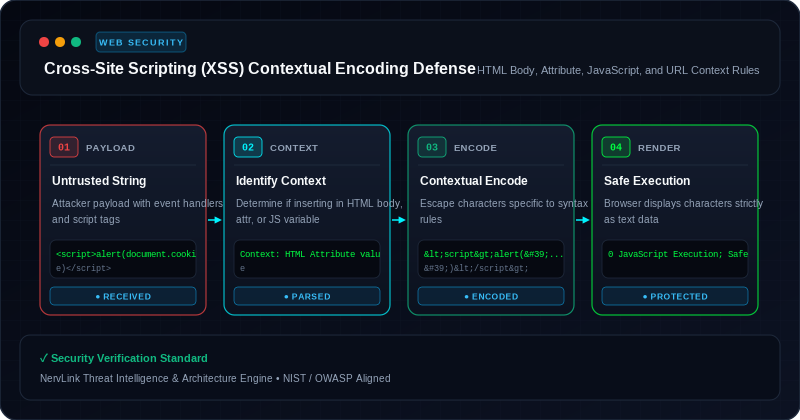
When a user value should appear as text, use the framework's normal text interpolation or a DOM API such as textContent. Do not concatenate strings into innerHTML. If rich HTML is a product requirement, use a maintained HTML sanitizer configured with an explicit policy that permits only required elements and attributes. Sanitize as close as possible to the HTML rendering boundary and keep the sanitizer updated.
Input validation can enforce business rules such as maximum length or allowed formats, but it does not prove that a value is safe for every output context. A username may contain punctuation that is valid business data and still need HTML encoding when displayed. Avoid altering user data globally in ways that corrupt stored values or create double-encoding bugs.
Encode for each browser context
HTML text, quoted attributes, URLs, JavaScript strings, and CSS values have different parsing rules. Use the correct encoding or safe API for each context, keep tag and attribute names fixed, and quote ordinary attribute values. Do not place untrusted values into event-handler attributes, script source, style blocks, or other contexts where the browser interprets them as code.
When constructing a link, validate the destination scheme and origin according to the feature, then encode query parameters with a URL API. URL encoding alone does not make a javascript: URL safe. For dynamic styling, use a fixed CSS property and constrain values with an allowlist. Do not interpolate untrusted text into selectors, CSS syntax, or script code.
Review DOM-based data flows
Client-side code can create XSS after the server has returned an ordinary string. Trace values from URL parameters, fragments, post messages, local storage, API responses, and user content to DOM sinks. Prefer textContent, safe element creation, and property assignments that treat values as data. Avoid eval, Function, string-based timers, and HTML-parsing APIs with untrusted input.
Sanitization and encoding are not interchangeable. Sanitizing HTML is appropriate when a feature must preserve selected markup. Encoding is appropriate when the value should display literally. Applying HTML entity encoding before passing a value to a sanitizer or framework can cause double encoding or unexpected interpretation. Define which component owns each transformation and test the rendered browser result.
Use Content Security Policy as defense in depth
A Content Security Policy (CSP) can reduce the impact of some injection flaws by restricting script sources and unsafe execution paths. It is not a replacement for safe output handling. Begin with a report-only policy, review violations, remove unsafe inline script dependencies, and introduce nonces or hashes where necessary. Avoid a broad policy that allows arbitrary hosts or unsafe-inline and then treating it as an XSS fix.
Deploy CSP consistently across relevant pages and test application behavior, analytics, embedded content, and browser compatibility. Monitor reports for real violations and policy mistakes. A strict policy may expose existing design assumptions, so roll out with a plan to tighten it rather than leaving report-only mode indefinitely.
Test the actual rendering context
Add tests for user-controlled text in ordinary HTML, attributes, URL fields, and any rich-content feature. Include stored content and client-side DOM updates. Use a browser-based test to confirm that malicious-looking values render as inert text and that expected formatting remains intact. Review every escape hatch such as dangerouslySetInnerHTML, raw DOM APIs, template concatenation, and third-party rendering components.
Treat security scanners and payload lists as aids. They can find common patterns but may miss flows across components or report benign cases. A code review should identify the sink and the encoding or sanitizer contract. For any reported issue, verify the browser's interpretation in the permitted test environment and add a regression test for the actual path.
XSS remediation checklist
Keep untrusted content in text nodes; use framework escaping; avoid raw HTML and script contexts; apply a maintained sanitizer only for required rich content; validate URL destinations separately; review client-side sources and sinks; deploy CSP as an additional layer; and test real rendering behavior. Reassess when adding new rich text editors, third-party widgets, or browser APIs.
XSS prevention works when data remains data from input through rendering. Choose controls at the point where the browser interprets content, keep context boundaries explicit, and test both stored and client-side flows. A content security policy can limit damage, but safe rendering remains the primary defense.
References
- OWASP: Cross Site Scripting Prevention Cheat Sheet
- OWASP: DOM-based XSS Prevention Cheat Sheet
- OWASP: Content Security Policy Cheat Sheet