Path Traversal Prevention: Safely Resolve User-Selected Files
Path traversal happens when an application uses a caller-controlled path to access a file outside the intended directory. A feature that downloads a report, reads a template, or displays an uploaded object may appear to accept only a filename, but encoded separators, alternate path syntax, symbolic links, normalization behavior, and platform differences can change what file the operating system opens.
The strongest design avoids accepting raw filesystem paths. Give users an opaque object identifier, look it up in an authorization-controlled database, and let the server retrieve the associated storage key. If a relative path is a necessary part of the product, constrain it to a known root and validate the final resolved path immediately before access.
Prefer identifiers over path strings
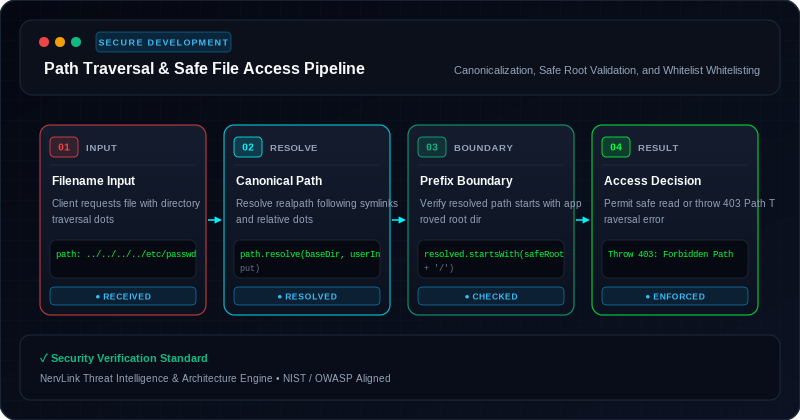
For user-facing download endpoints, accept an application-generated identifier rather than a path such as reports/2026/file.pdf. Resolve the identifier to a storage record only after checking ownership and authorization. This prevents a caller from choosing parent directories or selecting operating-system files simply by editing a URL parameter.
For static resources, map a short allowlisted name to a fixed file path in code. Avoid allowing users to select arbitrary templates, configuration files, or server paths. If a feature offers a directory browser, define the authorized root and permissions explicitly; do not use an uploaded name as the direct storage location.
Canonicalize and constrain before opening
If a relative path must be accepted, decode it consistently once, reject null bytes and unexpected separators, normalize it with the platform's path library, and resolve it against a trusted base directory. Confirm the resulting canonical path remains within that base. Account for case sensitivity, drive prefixes, UNC paths, mixed separators, Unicode normalization, and encoded traversal segments according to the platforms the service supports.
String prefix checks are not enough. A path such as /safe/root-elsewhere/file starts with /safe/root as text but lies outside that directory. Use path-aware relative comparison and verify the resolved result is not absolute or escaping through ... Ensure the base directory is itself canonical and not controlled by an attacker.
A check followed by a later open can create a time-of-check/time-of-use race if an attacker can change symlinks or directory entries between the two operations. Where that threat applies, use safe file APIs that open relative to a trusted directory handle, disallow symlink traversal, or isolate the file store so the attacker cannot modify path components. Do not assume a string normalization check eliminates filesystem races.
Keep authorization separate from path validation
A path that stays within the allowed root may still refer to another user's file. Check the authenticated user's permission for the specific object and action, not only whether the name looks safe. Avoid sequential identifiers that let users enumerate records, and do not treat obscurity as authorization. Apply the same check to read, write, delete, and metadata operations.
For cloud object storage, use server-side object identifiers and narrowly scoped credentials. Do not let user-controlled keys choose arbitrary buckets, prefixes, or provider URLs. If temporary download links are required, generate them only after authorization and constrain them to the specific object and a short validity period.
Use safe storage patterns for uploads
Store uploaded files outside the executable web root or on a separate storage service. Generate storage names server-side, preserve the original name only as validated display metadata, and prevent uploaded configuration files from affecting server behavior. Apply size limits, type checks, and safe processing before making a file available. File upload validation and path traversal prevention are related but distinct controls: a valid image can still be stored or retrieved through an unsafe path.
Apply least-privilege filesystem permissions. The application process should not read arbitrary system paths or write to code directories. Separate temporary, uploaded, and executable content locations. A compromised process should not be able to overwrite application configuration by choosing a path through a file feature.
Test traversal behavior safely
Test with a controlled fixture directory that contains a known file inside the permitted root and a harmless marker outside it. Include parent-directory segments, encoded and double-encoded forms, absolute paths, platform-specific separators, Unicode variants, null bytes where the language permits them, and symlink cases. Assert that the application denies the request and does not open or expose the outside marker.
Test authorization independently: an allowed user can access their own file, another tenant's identifier is denied, and administrative access follows a separate policy. Add regression tests for the exact decoding and normalization layers used by proxies, frameworks, and the application. Avoid probing operating-system files or production data during testing.
Logging and incident response
Record rejected path attempts using a safe event code, request identifier, user identity, and limited normalized metadata. Escape untrusted input before logging and avoid writing full paths that expose sensitive server structure. Alert on repeated traversal attempts and unexpected file-access patterns. If a path flaw exposes files, identify the affected root, review access logs, contain the endpoint, rotate any exposed credentials, and determine which data was retrieved.
Path traversal checklist
Use opaque IDs instead of raw paths; map choices through server-owned records; normalize with platform path APIs; enforce containment using canonical paths; mitigate symlink races where relevant; check object authorization separately; isolate uploads from executable content; restrict filesystem permissions; and test traversal and cross-tenant cases with harmless fixtures.
Secure file access depends on both path containment and authorization. Prefer an identifier-based interface, keep filesystem structure inside the service, and apply the final policy at the moment the file is opened. This design reduces both path manipulation risk and accidental exposure between users.
References
- MITRE CWE-22: Improper Limitation of a Pathname to a Restricted Directory
- OWASP: Input Validation Cheat Sheet
- OWASP: File Upload Cheat Sheet