Roll Out Content Security Policy Without Breaking a Production Site
Content Security Policy (CSP) is a browser-enforced policy that can restrict where a page loads scripts, styles, images, frames, and network connections. It can reduce the impact of some cross-site scripting mistakes, but it does not replace output encoding, safe DOM APIs, dependency review, or HTML sanitization. A rushed policy can break a production application, while a policy with broad sources and unsafe-inline may offer little protection.
Treat CSP as an application inventory and rollout project. Find the real script and connection sources, observe violations, tighten the policy in stages, and keep a rollback path. Single-page applications, analytics, payment flows, embedded content, and tag managers each have different dependencies. Build a policy from what your site actually needs rather than copying a generic example.
Inventory behavior before writing directives
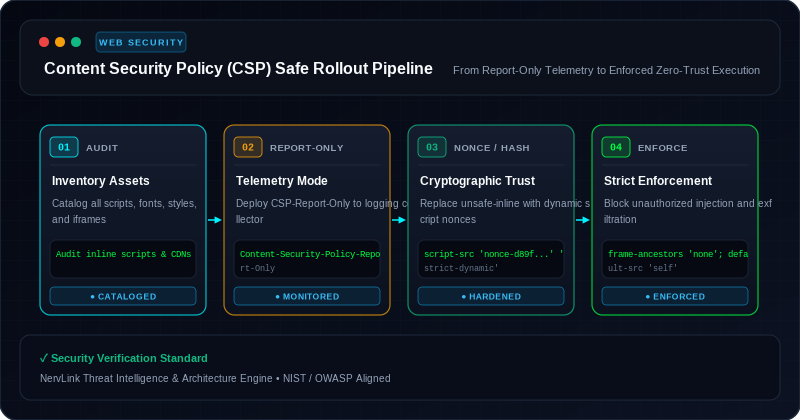
Search application code and deployment configuration for script loaders, fetch and WebSocket calls, fonts, images, inline styles, frames, workers, and form destinations. Inspect the browser network panel on each important route, including a tool page, contact flow, login or billing route if present, and a consent-managed view. Include CDN assets and production-only analytics. A build that runs locally can still load different origins in production.
Each resource type has a directive. script-src controls scripts, style-src stylesheets and style blocks, img-src images, font-src fonts, connect-src fetch/XHR/WebSocket/EventSource, frame-src embedded frames, and form-action form submissions. default-src is a fallback, not an inventory. frame-ancestors controls who can embed your page and must be delivered in an HTTP header to be effective. base-uri limits the base URL element, while object-src 'none' disables legacy plugin content.
Decide which hosts are controlled by your organization and which are third parties. A wildcard such as https: in script-src permits scripts from far more locations than the page normally needs. Avoid adding an entire domain family to silence one violation until you understand the source. Third-party hosts can change their subdomains and content independently, so every exception expands the trust boundary.
Start with report-only mode
Send a Content-Security-Policy-Report-Only header in production before enforcing a restrictive policy. Report-only mode records what would have been blocked but allows the current behavior. Pair it with a real reporting endpoint or provider that accepts CSP reports, handles abuse, and avoids collecting unnecessary browsing data. CSP reports can contain document and blocked URLs, so set retention, access, and redaction policies.
Browser extensions, injected corporate software, and malformed reports can create noise. Group events by route, directive, blocked source, and user agent. Reproduce likely application violations in a clean browser. Do not loosen the policy simply because an extension reports a blocked script that your application does not use.
A response might begin with a restricted default and explicit known sources, but the exact values must come from the inventory. For example:
Content-Security-Policy-Report-Only: default-src 'self'; object-src 'none'; base-uri 'self'; frame-ancestors 'none'; report-to csp-endpoint
Reporting-Endpoints: csp-endpoint="https://reports.example.com/csp"
This example is not a complete production policy: it deliberately omits script, style, frame, and connection exceptions. Do not copy it as an enforced policy without testing your application.
Reduce inline script dependence
An enforced script-src with unsafe-inline permits a broad class of inline scripts and weakens CSP's value against injection. Prefer external scripts from known sources, a strict nonce-based policy generated per response, or hashes for stable inline blocks. A nonce must be unpredictable and unique to each response, and every permitted inline script must use the matching nonce. A static nonce baked into a build is not a nonce security control.
Hash-based allowances work for exact inline script content, but any byte change alters the hash. Build systems that inject serialized state or mutate script blocks can make this brittle. Inventory all script execution patterns, including inline event handlers, javascript: URLs, eval-like functions, and third-party tag managers. Remove unsafe patterns instead of adding broad exceptions. Use Trusted Types where supported and compatible to reduce unsafe DOM injection sinks.
Enforce in stages and monitor regressions
After report-only data shows that normal journeys work, enforce a policy in a small rollout if your delivery platform supports staged headers. Begin with high-confidence restrictions such as object-src 'none', base-uri 'self', and frame-ancestors 'none' after confirming legitimate use. Add a strict script policy after inline scripts and dependencies are understood. Keep report-only alongside an enforced baseline when you want to test a stricter next version.
Use a deployment checklist: exercise the home page, article pages, contact form, every tool that calls an API, any payment or account flow, and consent states. Verify scripts, API calls, image loading, and required frames. Watch violation rates after rollout and connect reports to the deployed release. Keep an immediately deployable rollback for the header, not just an application code rollback.
Do not confuse connect-src with CORS. CSP decides what the page may request; CORS determines whether browser JavaScript can read a cross-origin response under the Fetch rules. Both may need configuration, and neither replaces server-side authorization.
Common policy mistakes
- Allowing
https:globally in every directive because a page uses a few HTTPS services. - Shipping a static nonce or reusing the same nonce across responses.
- Relying on a CSP meta tag for
frame-ancestorsor reporting features that require headers. - Treating zero reports as proof when the reporting endpoint is misconfigured or traffic is low.
- Trusting every subdomain of a third-party provider without a business need.
- Leaving report-only in place forever and assuming it blocks anything.
- Using CSP as a replacement for fixing unsafe HTML insertion.
Rollout checklist
- Inventory resource origins and route-specific behavior in production.
- Send a report-only policy and confirm reports arrive with useful, privacy-conscious detail.
- Triage real violations separately from browser extensions and malformed noise.
- Remove inline execution patterns and narrow third-party sources.
- Enforce in stages, verify key user journeys, and watch the release.
- Keep a tested policy rollback and continue monitoring after each dependency change.
OWASP recommends delivering CSP with response headers and using report-only mode as a precursor to enforcement. The W3C CSP specification defines policy parsing and enforcement behavior. Browser support and exact application requirements still need to be validated against the users and routes you support.
References
- OWASP Content Security Policy Cheat Sheet
- W3C Content Security Policy Level 3
- MDN: Content-Security-Policy-Report-Only
Editorial status: Owner authorized publication without an individual reviewer. A report-only policy does not block resources.