Secure File Uploads: Validation, Storage, and Safe Processing
File upload features accept complex, attacker-controlled input and pass it through parsers, storage systems, and sometimes other users' browsers. A filename ending in .png does not prove the file is a valid image, and a browser-provided Content-Type header can be forged. A secure upload pipeline applies independent checks before the file is stored, processed, or served, with limits at every stage that consumes resources.
Start by asking whether the application needs arbitrary file upload at all. If the product only needs a profile picture, accept a narrow set of image formats and produce a normalized output. If it needs documents for a business workflow, define the exact formats and maximum sizes. A broad “accept all files” policy is harder to secure and harder to moderate than a documented business-specific allowlist.
Authorize the upload and constrain the request
Require authentication when the feature is intended for registered users, and authorize the user to create or update the relevant object. Apply CSRF protections to browser-based forms that rely on ambient cookies. Enforce request-size limits at the gateway or reverse proxy as well as in application logic, so oversized bodies are rejected before expensive multipart parsing or disk spooling begins.
Set limits on file count, individual file size, total request size, filename length, and processing time. Consider decompressed size and nesting depth when extracting archives; a small compressed input can expand into enormous output. Apply quotas per user and globally, and clean up abandoned temporary files. Limit concurrent document conversions and image transformations, since parsers can consume much more CPU and memory than the upload itself.
Validate metadata and contents independently
Treat the submitted name, extension, declared MIME type, and any client-side validation as untrusted. Decode and normalize the filename before applying policy, reject path separators and control characters, and generate a server-side identifier rather than using the original name as a storage path. The original filename can be retained as display metadata only after safe encoding and length checks.
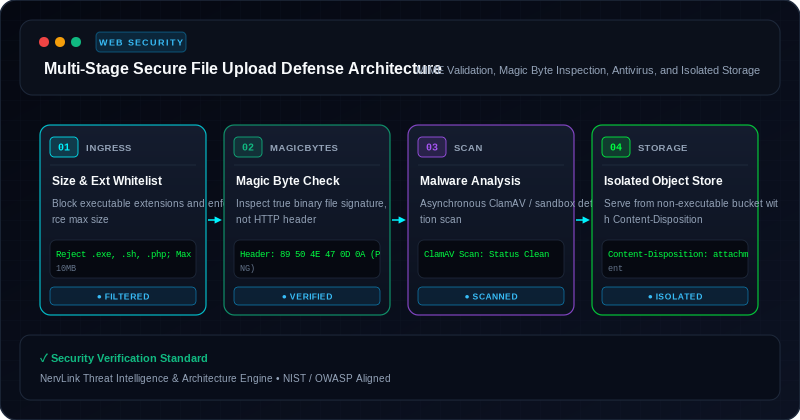
Use an allowlist of expected extensions and inspect the content with a parser appropriate for that type. MIME type and file signatures can help identify obvious mismatches but neither is sufficient by itself. A signature check can be bypassed or coexist with active content. Use a maintained parsing library configured for only required formats, update it promptly, and run high-risk processing in a constrained worker or sandbox without unnecessary network access or credentials.
For image uploads, decode and re-encode to an approved format when the application can tolerate that transformation. Remove metadata that is not needed, such as location data. Re-encoding reduces some risks but does not make an unsafe image-processing library safe; use resource limits and keep the decoder patched. For documents, consider content-disarm-and-reconstruction or malware scanning when appropriate, and treat those services as additional checks rather than guarantees.
Store uploads away from executable content
Prefer a separate storage service or host. If files must be on the application server, keep them outside the web root and use an authorized download handler that maps an opaque identifier to the stored object. Do not allow uploaded HTML, SVG, scripts, or server configuration files to execute under the application's origin. If public retrieval is required, serve from a distinct origin with restrictive response headers and no ambient authentication cookies.
Set storage permissions so only the service identities that need access can read or write files. Use object keys generated by the application, not user paths. Keep uploaded content private by default and issue short-lived signed links only when needed. Ensure the download handler checks authorization each time; knowing an object identifier should not grant access to another user's file.
Make processing asynchronous and isolated
Do not perform heavy parsing in the same request path that handles user traffic. Store the upload in quarantine, enqueue a job with a reference to the object, and process it in an isolated worker with strict CPU, memory, wall-clock, and file-count limits. The worker should have only the permissions needed for its task, should not access cloud metadata or internal admin services, and should not be able to overwrite application code.
Track processing states such as received, scanning, accepted, rejected, and expired. Do not expose a file to users before the required checks complete. Make jobs idempotent so retries cannot create duplicate records or bypass validation. Record safe metadata and reason codes, but avoid putting file contents, secrets, or full untrusted names into logs.
Test the complete upload and retrieval path
Test valid files for each supported type, malformed files, mismatched extensions and content types, traversal-style filenames, oversized requests, excessive archive expansion, duplicate names, unauthorized uploads, and unauthorized retrieval. Confirm that rejected inputs never reach the public storage path and that temporary artifacts are removed. Verify rate limits and quotas under concurrent load, and observe what happens when the scanner or storage service is unavailable.
Review the browser side too. Render filenames as text, not HTML. Set download behavior and content type deliberately. If files are served from the same origin, a dangerous document can affect users who open it in an authenticated session. Consider Content-Disposition: attachment, a separate origin, and restrictive content-security behavior for user-controlled content.
Operational checklist
Define required formats and business limits; authorize uploads; enforce request and decompression bounds; generate storage names; verify content with maintained parsers; quarantine before release; isolate scanners and converters; store outside the executable web root; recheck authorization on download; and monitor abuse, failures, and storage growth. Assign owners for parser updates, retention, takedowns, and incident response.
File upload security is a lifecycle problem. The safest design limits what the service accepts, constrains how much work each upload can trigger, keeps untrusted files from executing, and checks access at retrieval time. Validate each layer independently because no extension check, antivirus scan, or storage setting can cover all of the others.
References
- OWASP: File Upload Cheat Sheet
- OWASP: Input Validation Cheat Sheet
- OWASP: Denial of Service Cheat Sheet