Harden GitHub Actions Deployments with OIDC and Least Privilege
Continuous integration workflows routinely receive access to source code, build artifacts, package registries, and production environments. A long-lived cloud key stored as a repository secret can turn a compromised workflow or dependency into a durable cloud credential. GitHub Actions can use OpenID Connect (OIDC) to request a short-lived identity token and exchange it with a cloud provider, avoiding a static deployment key. OIDC reduces credential lifetime, but it does not make an unsafe workflow trustworthy by itself.
The deployment should be authorized based on a specific repository, workflow context, branch or protected environment, and intended cloud role. The cloud provider validates claims in the signed token against a trust relationship. If that relationship accepts any repository or branch, the workflow has simply traded a long-lived secret for an overly broad way to mint temporary credentials.
Scope the token permission narrowly
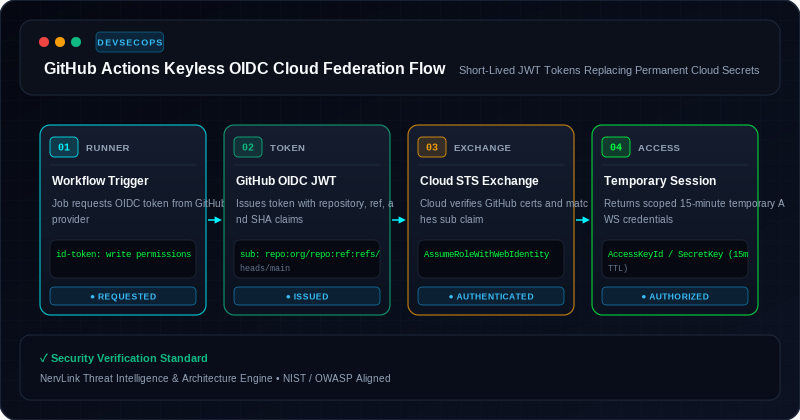
Grant id-token: write only to the job that needs to request an OIDC token. This permission lets the job ask GitHub for an identity token; it does not itself grant cloud access. Avoid setting it globally for every workflow or job. Keep contents: read and other GitHub permissions minimal, and explicitly specify permissions so a future default change or copied workflow cannot silently broaden access.
For example, a deployment job can declare its permissions and environment explicitly:
permissions:
  contents: read

jobs:
  deploy:
    environment: production
    permissions:
      contents: read
      id-token: write
This fragment shows the permission boundary only. Add the provider-specific authentication action or CLI configuration required by the target cloud, and pin any third-party action to a reviewed full commit SHA. Do not copy a sample role name or claim condition without adapting it to the actual repository, provider, and deployment model.
Restrict the cloud trust relationship
Configure the cloud-side identity provider to validate the expected issuer, audience, and subject claims. The subject should tie authorization to the intended repository and deployment context. Where supported, require a protected GitHub environment for production and configure reviewers, branch restrictions, and environment secrets or variables appropriately. A role for release deployments should not also grant broad administrative permissions or access to unrelated projects.
Test negative cases. A token from a feature branch, fork, different repository, or non-production environment should fail to assume the production role. Also verify that an untrusted pull-request workflow cannot use a job with deployment permissions. Fork builds usually need no production credential at all; separating build and deploy jobs makes that boundary easier to review.
Protect the workflow definition
OIDC tokens inherit the authority of the workflow that requests them. Protect workflow files with code review, branch protections, CODEOWNERS, and rules preventing untrusted actors from changing production deployment logic. Do not interpolate attacker-controlled pull-request text directly into shell scripts. Treat action inputs, artifacts, caches, and generated build output as potentially influenced by earlier workflow steps.
Pin third-party actions to a full commit SHA when practical; a mutable version tag can point to different code later. Review the pinned source and update it through a controlled dependency process. Use the fewest actions possible in the credential-bearing job. If a build job executes untrusted project code, keep it separate from the production authentication job and pass only a verified artifact across the boundary.
Bind deployment to a reviewed artifact
The workflow should deploy the artifact that passed the required checks, not rebuild arbitrary source after approval. Record the commit and artifact digest, then ensure the deployment job fetches the intended immutable artifact. Restrict who can create or overwrite workflow artifacts and caches, and do not use a cache produced by an untrusted branch as trusted deployment input. If the platform supports provenance attestations, verify provenance against the expected repository and workflow before deploying.
Use environment protections for production, but understand their limits. A human approval gate does not help if the approved job can run attacker-controlled scripts with the same token. Keep approval and execution boundaries explicit, and minimize what code runs after the token becomes available. Authenticate as late as possible and use the credential for the shortest feasible step.
Monitor and respond to identity misuse
Log role assumption and deployment events at the cloud provider. Preserve the GitHub run identifier, repository, commit, environment, and role in deployment records, but never print the raw OIDC token. Alert on unexpected subjects, unusual regions, off-hours access where relevant, and changes to trust policies or workflow permissions. Rehearse revoking the provider trust relationship and disabling a compromised environment.
Short-lived credentials limit persistence but can still cause substantial damage during their lifetime. Scope permissions to the exact deployment actions and resources. Separate roles for artifact publication, staging, and production. Avoid wildcard resource access unless the provider's deployment model requires it, and document every exception with an owner.
Validation checklist
Before relying on OIDC, confirm that the workflow has only the necessary token permission; the cloud trust policy checks the correct repository and context; production requires a protected environment; untrusted pull requests cannot reach deployment credentials; actions are pinned and reviewed; the deployed artifact is immutable and traceable; and cloud audit logs can identify the originating workflow run. Run a negative test from an unauthorized branch and verify that cloud role assumption is denied.
OIDC is a strong improvement over static secrets when its trust conditions are narrow and the workflow itself is protected. The security boundary includes GitHub permissions, branch and environment controls, action dependencies, artifact handling, provider trust policy, and cloud role permissions. Review those pieces together as one deployment identity system.
References
- GitHub Docs: OpenID Connect for cloud deployments
- GitHub Docs: Secure use reference
- GitHub Docs: OIDC in cloud providers