SSH Server Hardening: A Practical Access-Control Checklist
Secure Shell (SSH) is a common administrative channel for Unix-like systems, network devices, and automation. Hardening an SSH server means controlling who can authenticate, which credentials are accepted, what they can do after login, and how operators detect misuse. Changing a port or disabling passwords without an access recovery plan can create noise or lock out administrators while leaving the real authorization problems untouched.
Start with an inventory of hosts, SSH listeners, network paths, automation accounts, and human administrators. Identify which systems need inbound SSH at all. Where practical, use a managed access gateway, VPN, bastion, or just-in-time access process so the service is reachable only from approved administrative paths. Network restriction reduces exposure but does not replace authentication and host hardening.
Protect authentication and authorization
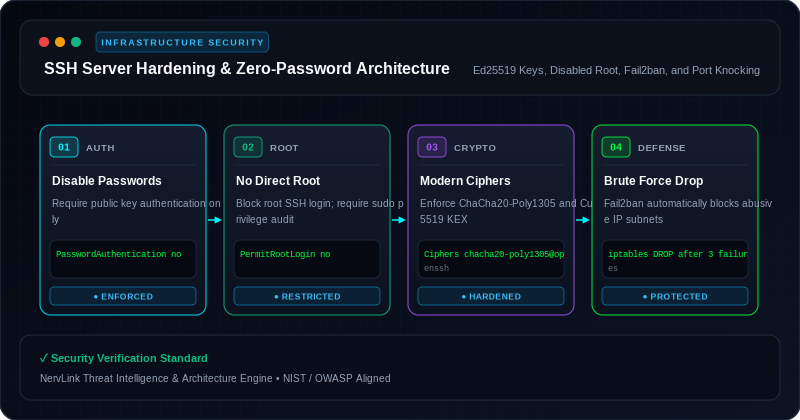
Use public-key authentication for administrative access where supported, and manage keys as credentials with owners, scope, rotation, and revocation. Require passphrases for human private keys and store them in an approved agent or hardware-backed authenticator when available. Avoid copying one shared private key across people or automation. A shared key makes attribution and revocation difficult because every holder has the same identity.
Review server settings for password, keyboard-interactive, root, and public-key authentication behavior according to the operating system and OpenSSH version. Do not paste configuration directives blindly: defaults and available options vary by release. Validate the effective configuration with the installed daemon's supported test mode, maintain console or out-of-band recovery access, and reload configuration without terminating the only working administrative session.
Disable direct root login where operationally feasible. Use named accounts, privilege elevation with separate credentials or approved controls, and command logging appropriate to the environment. Restrict access with groups or an allowlist of users, and remove dormant accounts promptly. An account that can authenticate but has no business purpose increases the number of credentials that must be protected.
Manage authorized keys and automation accounts
Inventory authorized keys and establish a process to identify the person, service, or pipeline that owns each one. Remove keys when access ends, and periodically review keys that have not been used or cannot be attributed. Store automation keys in a secrets manager and limit each key to a particular host group and operation. Prefer short-lived certificate-based SSH access or a managed identity system where the platform supports it.
OpenSSH authorized-key options can restrict certain uses of a key, but their security depends on correct configuration. For non-interactive automation, consider limiting the command, forwarding, and PTY capabilities required for the task. Avoid granting agent forwarding or port forwarding by default; these features can create paths through a trusted host. Test each restriction against the automation workflow before enforcement.
Reduce network and daemon exposure
Allow inbound SSH only from necessary management networks, and use host firewalls and cloud security groups as separate layers. Keep the OpenSSH server package updated through the operating system's supported security channel. A nonstandard port may reduce automated scanning noise, but it is not an access control and does not protect against a determined scan. Use rate-limiting or intrusion prevention carefully to reduce password-guessing noise without blocking legitimate administrators.
Restrict forwarding features unless they are required. SSH can tunnel network traffic, forward agents, and provide interactive shells; each capability can change the host's exposure. Review AllowTcpForwarding, AllowAgentForwarding, PermitTunnel, X11 forwarding, and related settings in context. A bastion used for approved tunnels has different requirements from a server that should only accept a deployment command.
Harden the operating environment
Protect private keys, host keys, configuration files, and authorized-key files with appropriate ownership and permissions. Use a secure, centrally managed baseline and avoid weakening host-level controls to resolve a single compatibility issue. Synchronize system time for useful event correlation, and ensure logs are forwarded to a protected location that an attacker with root access cannot easily erase.
Apply defense in depth through multi-factor authentication or a managed access workflow for sensitive systems. SSH keys prove possession of a private key; they do not establish that the user's workstation is healthy or that the access is approved for the current task. Combine network access, device posture, identity lifecycle, and privileged-access controls as appropriate to the organization's risk.
Monitor for abuse and prove the controls
Collect successful and failed authentication events, source addresses, account names, key fingerprints or certificate identities, and relevant session or privilege changes. Avoid logging private key material or secrets. Alert on root login attempts, use of disabled accounts, unusual sources, new authorized keys, configuration changes, and repeated failures. Review both daemon logs and host-level audit records because SSH authentication is only one part of a privileged session.
Test the effective policy from both permitted and prohibited networks. Verify that an unauthorized user, revoked key, disallowed forwarding request, and blocked password attempt fail as expected. Confirm a valid operator can still reach the system through the documented recovery path. When updating daemon configuration, run a syntax and effective-settings check, maintain an existing session until a new connection succeeds, and stage changes before applying them fleet-wide.
Hardening checklist
Inventory SSH exposure; remove unnecessary listeners; restrict management networks; use individually attributable credentials; disable unused authentication and forwarding methods; limit accounts and privilege; update the daemon; protect keys and configuration; centralize audit records; and test recovery access. Document exceptions such as legacy automation and assign an owner and retirement date.
SSH remains a dependable administrative protocol when its access paths and credentials are managed carefully. The goal is not to make login inconvenient; it is to make every allowed login attributable, limited to the needed authority, observable, and recoverable when a credential is compromised.
References
- OpenSSH: Manual pages
- OpenBSD: sshd_config manual
- NIST SP 800-53 Rev. 5 Update 1: Security and Privacy Controls