Docker Container Hardening: Reduce Privilege and Host Exposure
Containers package and isolate processes, but they share the host kernel and can access host resources when configured to do so. A Docker container is not a miniature virtual machine with an automatic security boundary. Risk depends on the image, process identity, Linux capabilities, mounted files, network exposure, daemon access, and the privileges granted at runtime.
The Docker daemon itself is highly privileged in a conventional rootful setup. A user who can control the daemon can often create containers with powerful host mounts. Treat access to the Docker socket as an administrative capability, not an ordinary application permission. Never expose an unauthenticated Docker API endpoint or mount /var/run/docker.sock into an untrusted workload simply to make container management convenient.
Run the process with the least privilege it needs
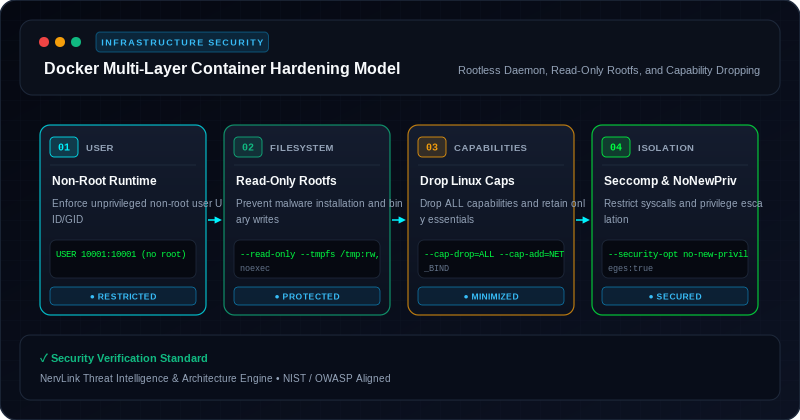
Prefer an unprivileged user in the image and set the runtime user explicitly when appropriate. Avoid --privileged, host PID or network namespaces, and broad Linux capabilities. Drop capabilities by default and add back only what the application requires. A workload that only serves HTTP usually does not need authority to administer network interfaces, load kernel modules, or access host devices.
Consider rootless Docker when its operational constraints fit the environment. Rootless mode runs both the daemon and containers without root privileges inside a user namespace, reducing the impact of some daemon and container vulnerabilities. User namespace remapping is another option, but the daemon itself remains rootful. Both approaches require validation of volume ownership, networking, resource controls, and compatibility with the workload.
Do not confuse non-root container identity with full isolation. A process running as UID 10001 may still have unnecessary capabilities, writable host mounts, or access to credentials. Review the entire runtime configuration, including inherited Compose files, Kubernetes pod settings, and platform defaults. Add policy checks that reject privileged containers and unapproved hostPath mounts before they reach production.
Reduce filesystem and secret exposure
Use a read-only root filesystem when the application supports it. Mount writable directories only where necessary and choose ephemeral storage for temporary state. Avoid mounting the Docker socket, host root, container runtime sockets, or broad directories from the host. If a mount is required, make it read-only unless the application has a documented write requirement, and scope it to the smallest path.
Keep secrets out of image layers and build arguments. A secret copied in one Dockerfile layer may remain recoverable in the image even if a later layer deletes the file. Use a supported build secret mechanism and a runtime secret provider, then verify that values do not appear in build logs, environment dumps, crash reports, or diagnostic bundles. Avoid baking environment-specific credentials into reusable images.
Use trusted base images, pin dependencies deliberately, and rebuild images when security updates are needed. Smaller images can reduce packages and attack surface, but minimality does not prove provenance or safety. Scan images and dependencies, verify signatures or attestations where available, and record the digest that was tested and deployed rather than relying solely on a mutable tag.
Constrain network and resource use
Publish only required ports. Bind management interfaces to private networks or loopback when possible, and avoid host networking unless its behavior is essential. Apply network controls outside the container as well, because a container bridge or user-defined network alone may not define which external destinations the process can reach.
Set CPU, memory, and process limits to reduce the impact of runaway code or denial-of-service conditions. Confirm the runtime and host actually enforce the chosen controls; rootless setups have platform-specific requirements for cgroups. Add health checks and restart behavior with care so that a crashing workload does not create an endless resource-consuming loop. Restrict disk usage and log retention for services that process untrusted input.
Secure the build and deployment chain
Build from a controlled context, exclude local secrets and irrelevant files with .dockerignore, and review every COPY instruction. Use multi-stage builds to keep compilers and temporary files out of the runtime image. Avoid installing packages from unverified sources during startup. Pin base images by digest for reproducibility where your update process can keep those digests current and supported.
Limit who can push images to production registries and who can change deployment definitions. Scan before promotion, sign or attest images if your environment verifies those records, and deploy the exact digest that passed checks. Protect the Docker daemon socket and registry credentials as separate administrative assets. A CI job that builds untrusted pull-request code should not hold production registry or host credentials.
Verify the effective configuration
Review a rendered container configuration, not just a Dockerfile. Compose overrides, orchestrator admission defaults, and environment variables may change runtime permissions. Use a configuration scanner as an aid, then test real controls: confirm the process UID, inspect capabilities, ensure the root filesystem is read-only when intended, check mounted paths, and verify that only expected ports are reachable.
For a compromised-process exercise, ask what the container can read, modify, or connect to. Can it access another tenant's files, cloud metadata, service credentials, or the host's container socket? Can a writable mount alter application binaries or deployment scripts? Can the process spawn unlimited children or fill a host volume? Use these answers to prioritize controls that reduce actual blast radius.
Hardening checklist
Run as non-root; avoid privileged mode and unnecessary namespaces; drop unneeded capabilities; consider rootless mode or user namespace remapping; make the root filesystem read-only where practical; limit mounts and published ports; keep credentials out of image layers; apply resource and network controls; use supported images and immutable digests; restrict daemon and registry access; and validate the deployed configuration continuously. Record exceptions with an owner and compensating control.
Container security is layered. Process restrictions, daemon protection, filesystem controls, trusted builds, and runtime monitoring address different failure modes. No single flag turns a container into a complete sandbox, so match controls to workload needs and verify the host and platform enforce them as expected.
References
- Docker Docs: Docker Engine security
- Docker Docs: Rootless mode
- Docker Docs: Isolate containers with a user namespace