Ransomware Recovery: Build and Test Backups You Can Restore
Backups are only useful during a ransomware incident if the organization can reach a clean copy, trust its integrity, and restore critical services within an acceptable period. A synchronized copy that an attacker can delete or encrypt from the production environment is not an independent recovery path. A backup that has never been restored is an assumption, not evidence that recovery will work.
Recovery planning should connect business priorities to technical procedures. Identify which services must return first, what data each depends on, and how long the organization can tolerate an outage. Document recovery time and recovery point objectives with business owners, then validate whether the chosen backup frequency and infrastructure can meet them. Different systems may need different strategies: a stateless web tier can be rebuilt, while a database requires consistent, tested restoration.
Separate backup authority from production authority
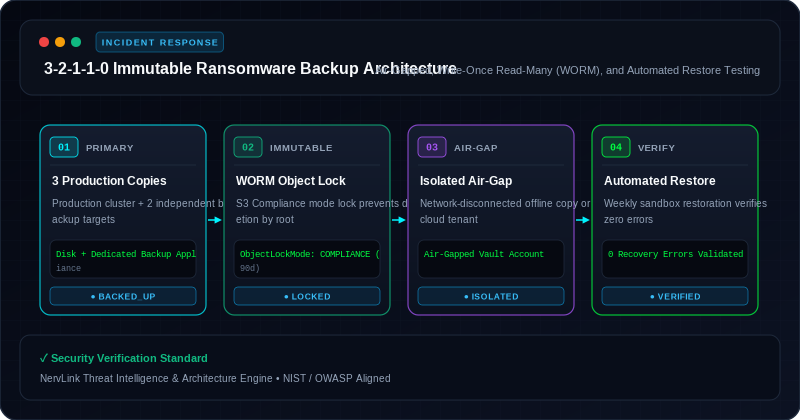
Use backup identities and administration paths that are not controlled by the same credentials as everyday production systems. Apply least privilege to backup operators and automation. Protect deletion and retention changes with separate approvals, immutable retention where supported, and alerting. If a compromised production administrator can immediately erase every backup, the design shares too much authority.
Maintain offline or otherwise isolated copies for critical data, and encrypt backups at rest and in transit. Protect encryption keys separately from backup storage, with a documented recovery and rotation process. Immutability can reduce tampering risk but does not automatically guarantee recoverability; verify retention settings, key access, and restore procedures. Keep copies in a separate failure domain where a single account, region, or administrator error cannot destroy every copy.
Include systems needed to recover the systems: identity services, network configuration, DNS, infrastructure-as-code, endpoint management, backup catalogs, and software installation media. Keep clean golden images and application installers. Protect the recovery documentation and emergency credentials so responders can access them without relying on a potentially compromised identity provider.
Define what “clean” means
A backup can contain malware, persistence mechanisms, compromised credentials, or corrupted data. Establish how responders select a recovery point and inspect it before restoration. Preserve relevant evidence before rebuilding when incident response requires it. Coordinate with incident leads to avoid restoring compromised systems or reconnecting them to a hostile network before containment is complete.
Record backup job outcomes, age, scope, encryption status, and storage location. Alert on missed jobs, unusual volume changes, retention changes, and deletion attempts. A green backup job means the copy operation completed; it does not prove that the data is complete, consistent, decryptable, or usable by the application. Add integrity checks and application-level validation for important datasets.
Rehearse restoration, not just backup creation
Schedule restore exercises for representative systems. Start with an isolated environment and a known recovery point. Restore the data, rebuild dependencies, validate application behavior, measure elapsed time, and capture each manual step. Include the people and approvals required during a real incident. The test should show whether the organization can restore from clean infrastructure when production credentials or networks are unavailable.
Use different exercises for different layers. A file-level test can prove that a selected object is retrievable; a full system test can prove that an application and its dependencies start; a business continuity exercise can reveal gaps in people, communications, and decision authority. Test databases with consistency checks and sample application transactions. For critical systems, conduct a recovery test that meets the agreed RTO and RPO.
Record failure details and fix them. Common gaps include expired encryption keys, stale runbooks, missing dependencies, DNS or certificate assumptions, slow data transfer, insufficient compute capacity, and application versions that cannot read the restored schema. Track corrective actions to closure and repeat the test after material architecture changes.
Coordinate recovery with incident response
During a ransomware event, responders should first coordinate containment, evidence preservation, communications, and recovery decisions. Isolating systems can prevent spread but may also affect backup agents and management channels. Follow the incident plan and consult appropriate internal leadership, legal counsel, insurers, and authorities according to organizational policy. Avoid ad hoc restoration from an unknown source while the scope of compromise is unclear.
Prepare a prioritized runbook for bringing systems back: clean identity and admin workstations first, then core network and security services, then high-priority business applications and data. Verify credentials and endpoint protections before reconnecting restored systems. Rotate secrets that may have been exposed, and monitor for the original intrusion path after recovery. A technically successful restore does not close the incident if attacker access remains active.
Measure resilience with evidence
Track backup coverage for critical systems, successful restore-test rate, restore duration, age of the oldest clean recovery point, and unresolved dependencies. Report exceptions when systems lack protected backups or owners. Use the results to prioritize investment: some services may need more frequent snapshots, stronger isolation, immutable retention, or a complete rebuild path rather than additional copies of the same data.
Keep runbooks clear enough for an alternate responder to follow. Include prerequisites, contacts, key custody steps, restoration commands, validation criteria, and rollback instructions. Store the runbook somewhere reachable if the normal collaboration or identity platform is compromised. Review it after every exercise and after changes to infrastructure, backup vendors, or encryption configuration.
Recovery readiness checklist
Identify business-critical services and recovery targets; isolate backup identities and deletion privileges; retain encrypted, protected copies; safeguard keys and recovery documentation; validate scope and integrity; test restores in isolation; measure recovery time; include identity and infrastructure dependencies; and track exercise findings. Repeat the exercise after meaningful changes rather than treating annual policy review as proof of readiness.
Ransomware resilience depends on prevention, detection, response, and recovery working together. Protected backups give responders an option, but restoration tests prove whether that option is practical. Build the recovery path before an incident, exercise it with realistic constraints, and use each result to remove the next obstacle.
References
- CISA: StopRansomware Guide
- NIST SP 800-34 Rev. 1: Contingency Planning Guide
- NIST SP 800-61 Rev. 3: Incident Response Recommendations