Amazon S3 Public Access: A Practical Bucket Review Checklist
An Amazon S3 bucket may contain public website assets, internal exports, backups, application uploads, or records subject to access restrictions. The security question is not simply “Is the bucket public?” It is whether the effective access paths match the data's intended audience, including bucket policy, access point policy, IAM identity policy, account settings, object ownership, ACLs, and any service that can read or publish the objects.
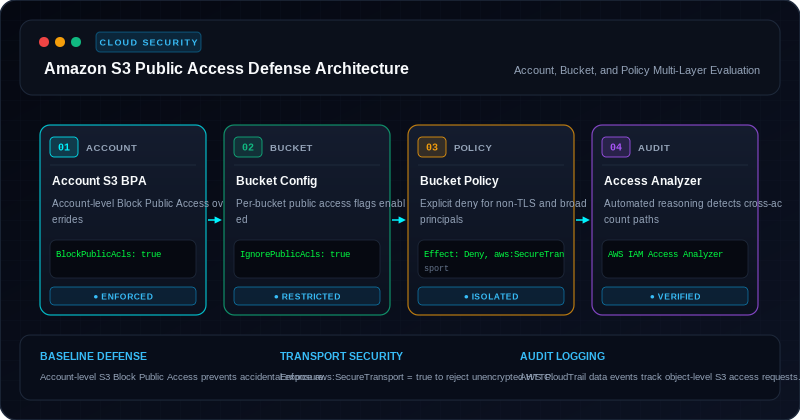
S3 Block Public Access provides guardrails at organization, account, bucket, and access point levels. AWS recommends enabling the controls broadly unless a documented use case requires public data. Because these settings can override policy grants, teams should understand their precedence and test the intended application behavior before enforcement. Public hosting can still be designed deliberately, often by placing a CDN in front of a private bucket, rather than exposing the storage origin directly.
Inventory data and intended audiences
Start with an inventory that identifies the bucket owner, environment, data classification, business purpose, public-access requirement, and responsible team. Classify objects as public, internal, confidential, or regulated according to the organization's policy. “Created by an application” is not a classification. A bucket can accumulate unrelated objects over years, so validate access at the prefix or object level where possible.
Find buckets and access points across every account and region. Include test accounts, legacy projects, replication destinations, and buckets that do not appear in the current infrastructure repository. Review the data lifecycle: uploads, exports, snapshots, static assets, and temporary files may have different access requirements. If no team can explain why a resource needs public access, treat that as an ownership and risk issue to resolve.
Review the complete authorization surface
S3 authorization can be granted through identity policies, bucket and access point resource policies, access control lists, and cross-account relationships. Block Public Access specifically prevents public access grants through resource policies and ACLs, but it does not replace a review of every IAM principal that has access. Consider who can change the policy, disable account-level protections, assume a role, or create a new public endpoint.
Check each of the four Block Public Access settings at the account and bucket levels, and review organization-level controls if used. AWS settings are designed to provide a stronger boundary when applied broadly, but propagation and analyzer findings can take time. Verify the actual configuration after changes and use policy-as-code or configuration monitoring to detect drift. Protect the ability to modify the controls with a separate administrative role.
Use IAM Access Analyzer for S3 and related findings to identify resources with external or public access. Analyzer output is a starting point: confirm whether access is intentional, whether the finding is current, and which policy statement creates it. A bucket policy may appear private while a separately attached access point or identity policy exposes data. Resolve findings through a change that preserves required application behavior, not by dismissing them without an owner.
Choose the right architecture for public files
If anonymous delivery is required, define precisely which objects are public and how they are served. For static websites, a CDN in front of a bucket can add caching, TLS, request filtering, and origin controls. Keep the origin private when the architecture supports it, and ensure the CDN identity can read only the required objects. If direct public S3 access is necessary, isolate the public content into a dedicated bucket or tightly scoped prefix rather than sharing a bucket with private uploads.
Avoid broad statements such as Principal: "*" with access to all object keys unless the entire bucket is intentionally public. Use a narrow resource path and read-only actions. Do not grant public write or list permissions as a shortcut for upload workflows. For temporary sharing, presigned URLs can provide time-limited access to a specific object, but the URL itself is a bearer credential: use an appropriate expiry, avoid logging it, and remember that it can be forwarded while valid.
Validate deployment and prevent regressions
Before enabling or changing Block Public Access, test website routes, CDN origin access, signed downloads, and upload flows in a representative environment. Verify both positive and negative cases: expected users and services can retrieve the right objects, while anonymous callers and unrelated principals cannot. Check GetObject, listing, write, and ACL operations separately; a read-only page load does not prove that other access paths are closed.
Use infrastructure-as-code to manage bucket policies and controls. Add automated policy checks to review changes before deployment, and monitor for manual changes made through consoles or scripts. Record exceptions with the data owner, reason, exact resources, compensating controls, and review date. Alert when Block Public Access is disabled or a policy introduces public or cross-account access.
Include backups and replicas in the review. Replication can copy sensitive data into a destination account with a different policy posture. Ensure destination encryption, access logs, retention, and public-access settings match the data's classification. For incident response, know how to remove a public grant, invalidate CDN caches if needed, preserve logs, and determine which objects were retrieved during the exposure window.
Checklist for a bucket review
Confirm a named owner and business purpose; classify data; inventory all account, bucket, access point, IAM, and ACL grants; enable the broadest suitable Block Public Access controls; investigate Access Analyzer findings; separate public assets from private data; scope public delivery to exact object paths; test authorized and anonymous requests; watch policy changes; and rehearse revocation and cache invalidation. Revisit the inventory after application or account changes rather than relying on a one-time audit.
S3 public-access security is an authorization and data-governance problem, not merely a toggle. Central guardrails reduce the chance of accidental exposure, while careful policy design keeps legitimate delivery working. Combine both with continuous monitoring and clear ownership so that exceptions remain visible and temporary when possible.
References
- AWS: Blocking public access to Amazon S3 storage
- AWS: Granting public access to S3 data
- AWS IAM: Access Analyzer supported resource types