Web Application Security Test Plan: Scope, Coverage, and Evidence
A web application security test is useful when it answers a defined question about a specific system under authorized conditions. Without clear scope, test accounts, operational limits, and evidence handling, testing can miss important features or disrupt production. A test plan aligns the application owner, testers, and response contacts before probes begin and gives the final report enough context for engineers to reproduce and fix findings.
The plan should distinguish a vulnerability assessment, an application security review, and a penetration test. These activities can overlap, but they do not automatically provide the same depth or assurance. State the method, coverage, constraints, and exclusions so stakeholders do not infer that untested components were assessed.
Define scope and authorization
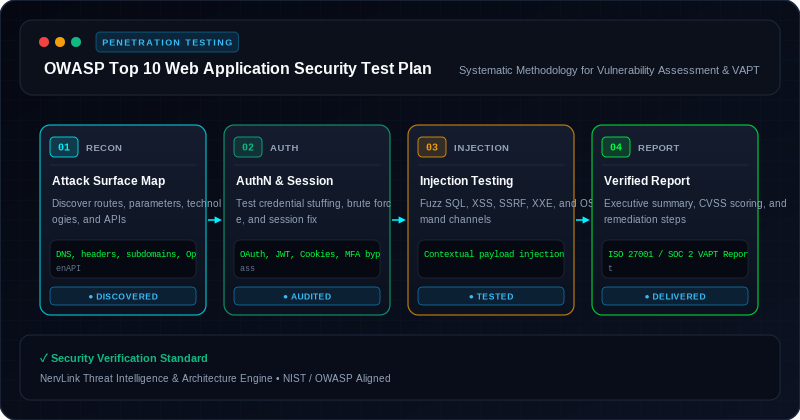
List the exact domains, APIs, environments, mobile clients, and supporting integrations in scope. Identify third-party systems that must not be tested without separate written permission. Set the test window, source addresses, rate limits, and whether automated scanning is permitted. Name a technical contact who can pause testing if availability or customer impact changes.
Confirm the rules of engagement in writing. Include authorization from the system owner, prohibited techniques, data-handling rules, escalation contacts, and incident response expectations. If testing production, define how to handle accidental access to real personal data or a safety-impacting issue. Use a staging environment for destructive or high-volume tests unless production behavior is essential and explicitly authorized.
Map the application and its trust boundaries
Inventory user roles, entry points, API versions, authentication methods, tenant boundaries, critical workflows, and data classes. Include administrative and support functions, password recovery, file upload, payment or account changes, and integrations. Review an architecture or data-flow diagram if available, then verify it against the running application.
Create test accounts for each important role and tenant. Access-control testing requires comparison across identities; one privileged account cannot prove that users are isolated. Include unauthenticated access, expired sessions, changed roles, and account lifecycle behavior. Document test data and avoid using real customer accounts unless the owner explicitly authorizes them.
Choose coverage based on risk
Use a recognized testing guide or verification standard to structure coverage, then prioritize the application's highest-impact assets and workflows. Test authentication, authorization, session management, input validation, business logic, cryptographic use, configuration, error handling, API behavior, and file processing as relevant. A checklist helps prevent blind spots but does not replace application-specific reasoning.
For each area, define a question and expected evidence. For example, authorization testing can check whether a user from one tenant can access another tenant's object by changing an identifier. Session testing can check how logout, password reset, and role changes affect existing tokens. Business-logic testing can examine state transitions and whether repeated or reordered operations produce unintended outcomes.
Balance manual testing and automation. Automated scanners can find common misconfigurations and known patterns quickly, but authenticated workflows, subtle authorization flaws, and business logic often require human exploration. Avoid aggressive scanning that exceeds agreed request rates or tests out-of-scope hosts through redirects or embedded resources.
Manage data and operational risk
Use synthetic data wherever possible. Capture only the evidence needed to demonstrate a finding, redact tokens and personal information, encrypt working files, and restrict access to the testing team. Establish retention and deletion dates for notes, screenshots, traffic captures, and exported data. If sensitive data is encountered, stop unnecessary access and follow the agreed escalation process.
Monitor service health during testing. Define thresholds for response time, error rate, and resource saturation that require a pause. Testers should notify the contact if they observe a production issue or unexpected data exposure. The owner should make a real-time decision about continuation rather than relying on an assumption that the original schedule remains safe.
Write findings for remediation
For each issue, record affected asset and route, preconditions, tested account role, reproducible steps, observed result, expected result, and evidence. Explain security impact in the application's context, including data or business processes affected. Include a practical mitigation and any relevant limitations. Avoid including secrets or unnecessary customer data in the report.
Prioritize with severity and business context. A score can help compare technical impact, but exposure, exploitability, existing controls, and affected users matter too. Distinguish confirmed vulnerabilities from observations and hardening recommendations. State testing limitations and untested areas clearly so stakeholders know what the report does and does not establish.
Retest and close the loop
Agree on remediation owners and target dates before the test ends. Retest fixes using the same relevant role, path, and preconditions. Verify that the vulnerability is addressed without creating a regression or merely hiding the finding behind a client-side control. Document residual risk when a fix is incomplete or accepted, including owner, rationale, and review date.
Feed lessons into the development lifecycle. Turn repeated findings into secure coding requirements, regression tests, reusable components, or design-review prompts. A test is more valuable when it changes the process that allowed the issue to recur.
Security test-plan checklist
Obtain written authorization; identify assets and exclusions; agree on test windows and stop conditions; map roles, data, and workflows; prepare safe accounts and synthetic data; select risk-based coverage; manage evidence securely; monitor service health; report reproducible findings with context; and retest remediation. Keep the plan and report connected to the tested release or environment.
A good test plan creates a controlled path from security questions to evidence and fixes. Define what is authorized, test the workflows that matter, protect the data encountered, and communicate limitations. This makes the assessment safer for users and more useful for the team that must improve the application.