PostgreSQL TLS: Migrate Clients to verify-full Without Breaking Production
Encrypted database traffic is not enough if a client can be tricked into connecting to the wrong server. PostgreSQL clients need both transport encryption and server identity validation. For libpq, sslmode=verify-full requires TLS, validates the certificate chain against a trusted root, and checks that the requested hostname matches the certificate. The default sslmode=prefer can fall back to a non-TLS connection and is not a good security target for a remote production service.
Migration is often difficult because certificates, hostnames, drivers, connection pools, and deployment environments have drifted over time. A safe plan inventories all clients, standardizes hostnames and trust material, measures failures before enforcement, and rolls out with an explicit rollback path. This guide focuses on PostgreSQL clients and does not assume that a database reachable through a private network is automatically trusted.
Understand the SSL modes before changing them
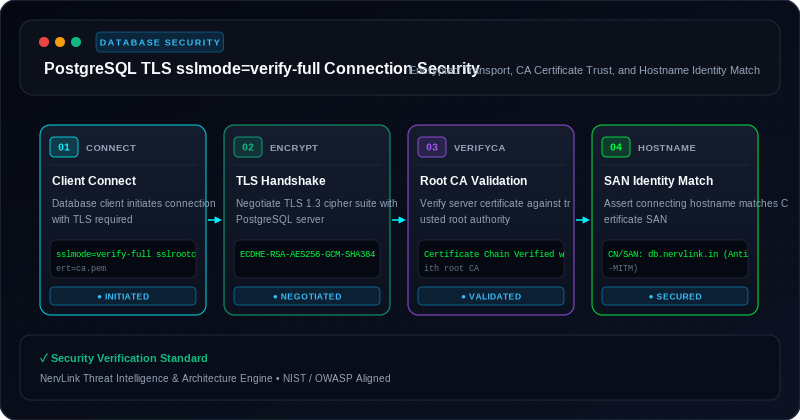
Libpq documents six sslmode choices. disable uses no TLS. allow tries plaintext first and then TLS. prefer, the backward-compatible default, tries TLS first but can fall back to plaintext. require insists on encryption but does not normally validate the host identity; when a root certificate is present, libpq may treat it like verify-ca for compatibility. verify-ca validates the issuing chain but not the hostname. verify-full checks both the trusted chain and that the requested server name matches the certificate.
For most security-sensitive remote connections, target verify-full. Use a DNS name covered by the server certificate's Subject Alternative Name. Connecting by an IP address requires the certificate identity to match that IP, which is often not what database certificates are issued for. Avoid workarounds that turn off verification after a mismatch; investigate whether the client is using the wrong endpoint, stale certificate, incomplete chain, or unintended proxy.
Prepare the server and trust chain
Confirm that PostgreSQL was built with TLS support and that the server presents the correct certificate and private key. The certificate needs the correct hostname identity and an appropriate validity period. Install intermediate certificates according to the CA's server instructions and ensure the key file permissions match PostgreSQL's requirements. If using a private CA, distribute its public root certificate through a trusted configuration-management channel. Do not put the private server key in client images, source control, or shared application bundles.
Test the certificate chain from each client network path. A server might be correct on one load-balanced node and stale on another. Repeat handshakes against each endpoint, including IPv4 and IPv6 where both are enabled. Inspect DNS, service discovery, connection pool settings, and any proxy or service mesh that terminates TLS. Document which component authenticates which peer; TLS terminated at a proxy does not automatically authenticate the database behind it.
Stage clients in observable groups
Build an inventory of applications and connection libraries: libpq command-line tools, Python drivers, JDBC, Node.js drivers, migration jobs, reporting tools, backups, and administrative clients. Record current SSL behavior, server hostname, driver version, trust store, owner, deployment cadence, and business criticality. Prioritize one non-production service and one representative production client rather than changing every connection string at once.
For libpq, configure a managed service definition or connection options such as sslmode=verify-full and sslrootcert=/etc/ssl/certs/company-db-root.pem. Environment variables such as PGSSLMODE can supply defaults but should not obscure the final configuration; log effective non-secret connection settings at startup. For Java, configure the driver according to its own documented SSL modes and truststore behavior. Similar parameter names do not guarantee identical semantics across drivers.
Run a negative test using a hostname that is not present in the certificate and confirm the client rejects it. Run another test with an untrusted CA. These should fail before credentials are sent. Then verify a correct connection succeeds and confirm on the database or proxy side that TLS is active and the expected protocol/cipher policy is used. Avoid logging passwords, connection URI secrets, or full environment dumps while diagnosing a failure.
Roll out and respond to failures
Enable strict verification for a pilot service, watch connection errors, and compare them with certificate and DNS telemetry. Typical failures include a missing root certificate in a minimal container, connecting by an internal alias not present in SAN, an expired intermediate, a stale connection-pool endpoint, and a test environment using a self-signed certificate that was never distributed to clients. Fix the trust configuration rather than downgrading verification for all clients.
Before expanding, create a deployment rollback that restores the previous application configuration without making plaintext the normal fallback. If emergency access is required, use an approved secure tunnel or a narrowly scoped temporary exception with a named owner and expiration. Keep the database listener private, require authentication independently of TLS, and use least-privilege database roles. Encryption protects a connection; it does not decide what a connected role may read or change.
Verify maintenance over time
Automate certificate expiry checks and verify the client path, not only the certificate file on disk. On every release, test trust configuration in the same container or runtime image used in production. Rehearse root CA rotation with overlap: distribute the new trust anchor, confirm clients trust it, rotate the server certificate, then remove the old root after observing all client populations. A hurried root removal can cause a widespread outage.
Use a query or connection diagnostic that reports whether the session is encrypted, but do not treat that as proof that the peer identity was verified. That verification occurs during the handshake. Retain enough connection and certificate telemetry to investigate failures while minimizing sensitive logs. Add tests that ensure new data clients cannot silently revert to a weaker mode.
Safe-testing and maintenance note
Perform negative TLS tests only against a database or test endpoint you control. Never expose a production database publicly to simplify certificate testing. Driver behavior can change between releases, so confirm the deployed version's official documentation. Last updated: 2026-11-09. Change log: Initial publication; libpq and pgJDBC configuration guidance checked against current documentation.