OAuth Device Code Flow Security: Reduce Phishing and Polling Abuse
OAuth's Device Authorization Grant is designed for devices that have limited input or lack a suitable browser, such as a TV or command-line appliance. The device obtains a short user code and asks the person to approve access on a separate browser-enabled device. That convenience creates a security boundary across two devices: an attacker can persuade a victim to enter a code belonging to the attacker's session and thereby authorize the attacker's client.
Device flow should be enabled only where the product genuinely needs it. A phone or laptop with a capable browser should normally use a browser-based authorization flow with the appropriate native-app protections. For a TV, CLI, or constrained terminal, implement the protocol's user instructions, code expiry, polling interval, and scopes carefully. Do not treat a successful device authorization as proof that the person intended the displayed client to receive broad account access.
Make the authorization context clear
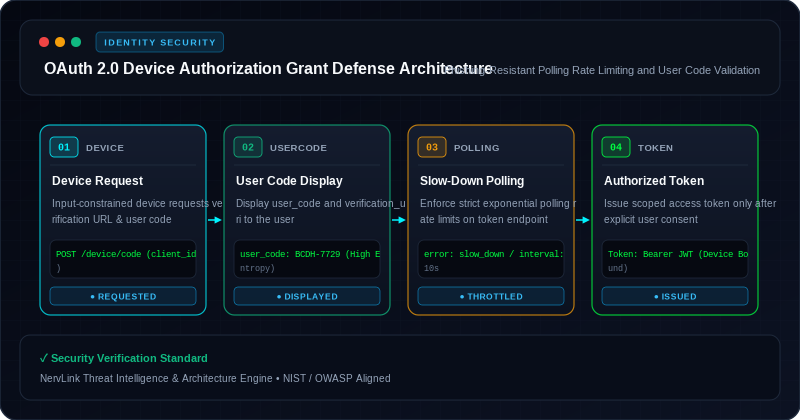
The device should show the official verification address, the user code, the requested service name, and a clear instruction to approve only a request they just initiated. Use a short, recognizable URL controlled by the identity provider. Do not direct the user to search for a login page or follow an arbitrary link sent by an untrusted party. The verification page should show the device or client name, requesting organization, requested permissions, and a meaningful denial path before consent is granted.
Use a distinctive client identity and ensure the displayed name cannot be freely supplied by the device request. Keep requested scopes narrow and explain high-impact permissions. Do not combine sign-in and consent in a way that hides the resource being accessed. If the authorization server supports additional context, display it in a consistent way that users can compare with the physical device or terminal that initiated the flow.
Implement code lifetime and polling correctly
RFC 8628 specifies two values with different purposes: a device code for the client and a user code the person enters. Keep the device code confidential and never display it as the user code. Generate codes with sufficient unpredictability, store them securely, and bind them to the requesting client and intended authorization request. Expire them after a short, documented period and invalidate them after approval or denial. Avoid placing bearer-like codes in analytics, browser history, referrer values, or routine logs.
The client polls the token endpoint because it cannot receive a browser callback. Honor the server-provided interval; wait at least five seconds when the response does not specify one, and increase the delay when the server returns slow_down. Do not spin on authorization_pending, retry faster after network errors, or let one device create unbounded sessions. Apply per-client and per-source limits to device authorization creation and token polling. Return generic responses where needed to avoid revealing whether a user code exists.
At the authorization server, bind approval to the exact pending device request. Enforce single-use authorization, a strict expiration, client identity, and the selected scopes. Ensure a device cannot reuse an approved code to obtain additional tokens or switch to another client. Revoke or expire issued refresh tokens according to the product's session policy, and provide account activity and revocation controls for users.
Threat model the cross-device handoff
The primary misuse pattern is remote social engineering: a caller poses as support or an employer and tells the victim to visit the verification site and enter a code. The victim sees a legitimate identity-provider page, but the approval belongs to the caller's device. Product messaging should say that support staff will never ask a user to read or enter a code to complete another person's login. Alert users when a device authorization is approved from an unfamiliar location or has unusual scopes, without claiming that location is precise identity evidence.
Protect the verification page from lookalike flows. Use a stable branded domain, strong TLS, anti-phishing education, and accessible labels. Do not let the user code act as a password on unrelated pages. Rate-limit guesses, choose an adequate code space, and monitor failed attempts. Avoid exposing whether a code is active before the user is authenticated, because that can help attackers test candidate codes.
Defensive test plan
In a test identity provider and test client, verify that expired, denied, malformed, and previously approved device codes cannot produce tokens. Confirm polling before the interval is rejected or delayed, and that slow_down changes the client behavior. Test that a client cannot replace its identity or expand scopes after approval. Verify that authentication on the browser approval page uses the site's normal session and multi-factor policies.
Exercise the user-facing flow with realistic anti-phishing scenarios: an unfamiliar device name, unexpectedly broad scopes, a code received from another person, and a device request the user did not initiate. Check that audit records identify the client, approval time, scopes, and revocation event while omitting raw device codes and access tokens. Review rate-limit behavior and alerting with test traffic, not production user accounts.
Operational limits and response
Device flow is not a replacement for standard OAuth authorization code with PKCE in applications that can use a browser. It is also not a secure pairing mechanism for arbitrary devices unless the identity provider binds the request and the user can reliably recognize what they are approving. Apply OAuth's general token safeguards, least privilege, secure storage, and revocation controls in addition to device-specific checks.
If a user reports approving a request they did not initiate, revoke the affected sessions and tokens, review the associated client and scopes, and investigate account activity. Do not merely ask the user to change a password if a long-lived refresh token remains valid. Update support scripts so staff do not request one-time codes, and provide a fast path to report suspicious authorization prompts.
Safe-testing and maintenance note
Run these checks only with a test identity provider and accounts you control. Do not submit real users' codes or attempt approval on third-party accounts. Cross-device security guidance evolves; check the OAuth security best practice and cross-device flow guidance when changing the protocol implementation. Last updated: 2026-11-09. Change log: Initial publication; device-flow behavior checked against RFC 8628 and current cross-device security guidance.
References
- RFC 8628: OAuth 2.0 Device Authorization Grant
- RFC 10027: Security of Cross-Device Flows
- RFC 9700: OAuth 2.0 Security Best Current Practice