Design MFA Enrollment and Recovery Without Creating a Bypass
Multi-factor authentication can significantly reduce the value of a stolen password, but the account's security is limited by the weakest enrollment, reset, and recovery path. An attacker does not need to defeat a strong authenticator if support can replace it after an email-only request or a help desk accepts easy-to-find personal details. Product teams should threat-model the full authenticator lifecycle, not just the code-entry screen.
MFA requires distinct factors, commonly something the user knows, has, or is. Requiring a password and a PIN that unlocks the same device may not provide independent factors. IP address, location, or device fingerprint can help assess risk, but they are signals, not authentication factors. These distinctions matter when translating assurance policies into user journeys.
Bind a new authenticator deliberately
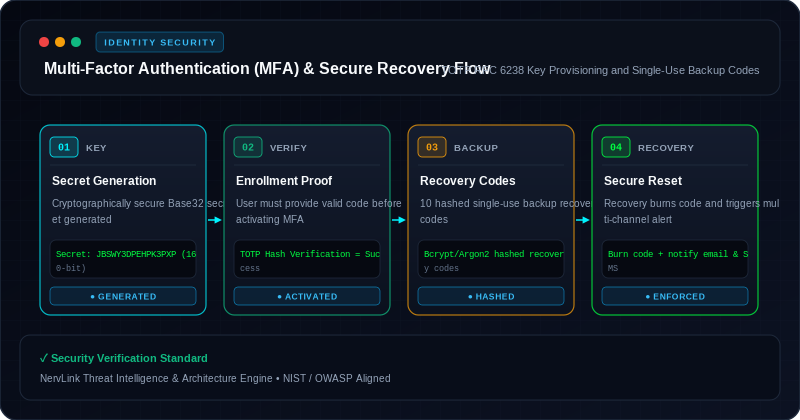
Enrollment should start from an authenticated session and require recent reauthentication appropriate to the account's value. For an existing account, notify the user that a new factor was added and make the event visible in account security history. For privileged accounts, require stronger proofing or an existing enrolled factor before adding another. A session that has been active for hours is not automatically sufficient evidence that the person at the keyboard controls the account.
For TOTP enrollment, show a one-time setup secret as a QR code or manually entered key, ask the user to produce a valid code before binding it, then invalidate the setup flow. Store the shared secret encrypted with appropriate key management, do not place it in application logs or analytics, and limit repeated verification attempts. Keep the time window narrow and prevent reuse of the same accepted code where practical. A TOTP seed is a long-lived authenticator secret; anyone who copies it can generate future codes.
Passkeys use public-key credentials and origin-bound challenges. The private key remains with the authenticator, and the server stores a public key and credential metadata. Verify the challenge, origin, relying-party ID, signature, and user-verification requirements on the server. Do not treat a browser prompt as proof until the signed assertion is checked. The WebAuthn specification defines the browser and authenticator protocol; implementation should use a maintained server library that validates the complete response.
Issue recovery material with clear properties
Recovery codes can help when a user loses their normal factor. Generate them with a cryptographically secure random source, display them once, explain that each code is single-use, and store only a verifier or protected representation. Require reauthentication before viewing or regenerating a set. Regeneration should invalidate every previous code and send a notification. Do not store recovery codes in browser local storage or log them in support systems.
Treat a recovery code as a credential. Apply attempt limits, invalidate it after use, notify the account owner, and record the recovery event without recording the code. Provide enough codes to make the feature usable but avoid a large persistent bypass set. Ensure users can store them in a password manager or print them without forcing unsafe storage in an unprotected notes app.
Make factor replacement harder than ordinary profile edits
Changing a phone number, removing a passkey, or replacing an authenticator is a high-risk action. Require proof using an existing factor when available. If the user has lost all factors, use a recovery process matched to the service's risk, support capacity, and identity-proofing model. A public self-service service with millions of users cannot rely on the same in-person verification process as a small internal enterprise, and an employee's manager should not be able to bypass controls informally.
For a recovery request, avoid asking for facts attackers can obtain from social media or data brokers. Protect support staff with a consistent process, required evidence, separation of duties for high-value accounts, and an auditable exception path. Do not ask users to send passwords, one-time codes, or recovery codes to support. Provide a way to report a suspicious factor change and rapidly revoke active sessions.
Notify the user through a pre-existing independent channel when a factor is added, removed, or reset. Where appropriate, delay sensitive operations briefly after recovery and notify the user how to cancel a fraudulent change. These controls can reduce damage from a compromised session, but a delay may have usability and safety implications. Set the window based on threat model and business function rather than copying a generic value.
Defend the OTP implementation
Time-based one-time passwords are short-lived but have a small output space. Enforce a strict attempt limit, short acceptance window, and one-time use behavior. Do not accept arbitrary future time windows to compensate for broken device clocks. Do not store a submitted OTP in analytics or logs. Generate enrollment secrets and backup codes with a cryptographically secure generator. A server-side risk check should not cause an OTP to be reused or the attempt limit to be bypassed.
SMS and voice codes can be easier to deploy, but depend on telephone-number control and the telecom ecosystem. They may be appropriate for some threat models, but should not be presented as phishing-resistant. Provide stronger choices such as passkeys or hardware-backed authenticators where the service and user population can support them. Explain the tradeoffs so a user understands the risk of the available recovery options.
Test lifecycle attacks, not only valid login
Create regression cases for enrollment without recent reauthentication, reuse of an accepted TOTP, brute-force attempts, lost-device recovery, replayed recovery codes, simultaneous factor replacement, and notification delivery failures. Test that a stolen session cannot silently remove every existing factor. Review API routes directly because hiding an enrollment button does not enforce authorization. Verify that audit events identify the account and action while redacting authenticator secrets.
Run usability testing with users who change devices, travel, or have accessibility needs. A recovery path that no one can complete will trigger unsafe workarounds and support exceptions. Provide clear export and backup instructions, offer multiple independently protected authenticators where possible, and explain how to revoke a lost device. Measure recovery failure and fraud signals together; optimizing only for fewer support tickets can hide a security regression.
Practical design checklist
- Require recent proof before binding, replacing, or removing an authenticator.
- Protect TOTP seeds, private recovery material, and reset links as credentials.
- Rate-limit and single-use short codes; notify users after factor changes.
- Make support recovery consistent, auditable, and proportionate to account risk.
- Test lost-factor, replay, session theft, and concurrent-change scenarios.
- Let users maintain more than one secure factor and revoke a lost one quickly.
- Distinguish phishing-resistant methods from SMS and risk signals in product copy.
OWASP's MFA Cheat Sheet covers enrollment, recovery, OTP handling, and factor changes. NIST SP 800-63B-4 defines authenticator and recovery requirements for digital identity services. WebAuthn specifies the public-key browser protocol, but secure use still requires server-side validation and a sound recovery design.
References
Editorial status: Owner authorized publication without an individual reviewer. Recovery requirements depend on assurance level and account risk.